


Graphic Design Trends Presentation


Every creative director, marketing manager, and digital agency owner knows the struggle of pitching design concepts. When you’re tasked with explaining abstract visual directions—like asymmetric layouts, variable typography, or minimalist vs. maximalist illustrations—words often fall short. Your presentation slides have to prove you understand the current visual landscape before you even open your mouth.
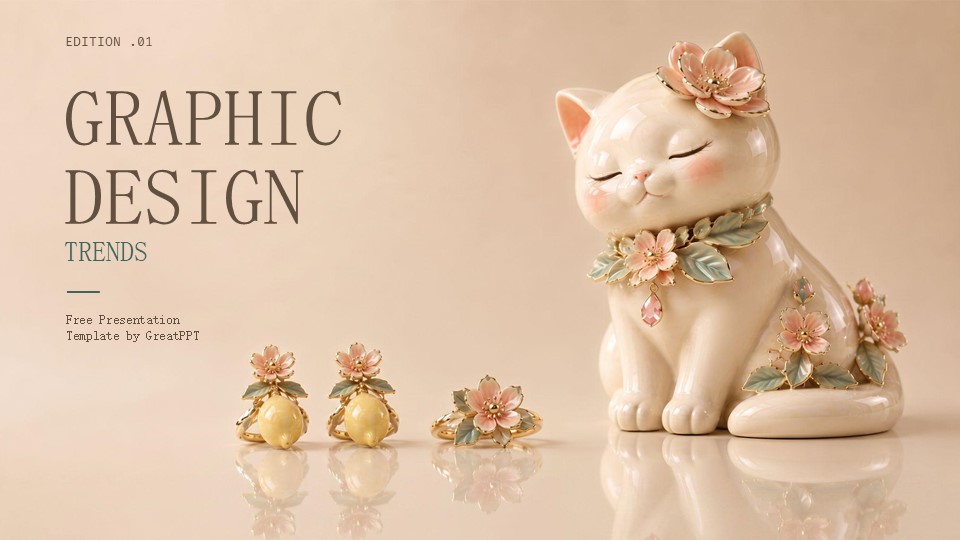
GreatPPT’s Graphic Design Trends presentation template is built specifically to address this hurdle. Instead of handing you a generic corporate slide deck, this multipurpose layout acts as a living showcase of modern design movements.
As a presentation consultant and content strategist, I evaluated this template’s architecture, asset library, and practical usability for creative pitches and industry briefings. Here is a definitive look at how it performs under the hood.
The Aesthetic Strategy: Walking the Design Talk
What immediately separates this deck from typical business templates is its willingness to take creative risks. It balances high-end editorial layouts with practical, information-first hierarchy.
Rather than leaning on cookie-cutter stock frames or predictable grids, the template leans into contemporary design motifs. It gives heavy focus to bold typographic elements, subtle textures, and layered geometric layouts. The background treatments and color spaces are tuned to ensure that whatever creative work you embed—whether it’s high-contrast branding assets or dreamy UI mockups—remains the hero of the slide. It’s an ideal canvas for agencies presenting brand strategy, social media trend reports, or creative lookbooks.
Core Specifications & Multi-Platform Compatibility
From a technical production standpoint, a template has to integrate into an agency’s existing software stack without causing file corruption or missing font errors. GreatPPT delivers solid cross-platform utility with this kit:
Platform Flexibility: Fully optimized for native editing inside Google Slides, Microsoft PowerPoint, and Canva.
Aspect Ratio: Mastered in standard 16:9 widescreen format, preventing stretching across modern 4K monitors, office projectors, or screen-shares.
Full Editability: Every vector asset, shape container, and color value can be re-mapped to match an external brand manual.
Bonus Toolkit: Includes a package of over 500 vector icons and integrated access to Flaticon extensions for rapid layout modifications.
Built-in Resources for Creative Teams
Where this template genuinely saves hours of production time is its tailored slide variety. It moves past basic text blocks to offer specific data and creative visualization tools:
Portfolio & Campaign Showcases: Clean, asymmetric mockups designed to display multi-device UI designs, print layouts, or photography campaigns without cluttering the screen.
Concept Comparisons: Side-by-side slide structures that make it simple to contrast competing ideas, such as minimal vs. maximal design routes or color palette variations.
Trend Breakdowns: Built-in infographics, content timelines, and data charts styled with contemporary accents to make internal performance audits or market research look visually cohesive.
Pro-Tip: Navigating the Premium Attribution Layout
This design asset is hosted under GreatPPT’s Premium tier. If you are operating on a free account, you can access select elements but must retain the original attribution slide at the end of your presentation. For professional client-facing pitches, investor updates, or public creative conferences, upgrading to a premium license is standard protocol to unlock seamless, unbranded deck exports.
Frequently Asked Questions (FAQ)
Can I use this template to pitch non-creative corporate projects? While it’s labeled for graphic design trends, its core structure is entirely multipurpose. However, because the typography and grid layouts are inherently expressive, it is best suited for forward-thinking industries like tech startups, marketing agencies, modern education, or digital media. For highly traditional corporate finance or legal pitches, a more conservative layout might be preferred.
How do I adjust the font weights to match my agency’s custom branding? Because the deck is 100% editable, you can swap the default typography using the master slide editor in PowerPoint, Google Slides, or Canva. If you want to lean into modern trends, try replacing the header layers with a bold, geometric variable font while keeping the body text at a highly legible 24–32 pt sans-serif.
Does downloading the template as a PPT file break the vector icons? No. The asset library and vector shapes are built using standard web and desktop design rules. When you download the file for Microsoft PowerPoint, the icons retain their properties as vector shapes, allowing you to recolor or resize them without losing edge sharpness.
Share Now!
Presentation Tips

Recent Templates


Related Products
Same Contributor
Featured Products