


Design Thinking Presentation


Unlocking Innovation: A Deep Dive into the Design Thinking Presentation Template
In the modern business landscape, solving complex problems requires more than just standard spreadsheets and bulleted lists. Whether you are an agency lead pitching a user-experience overhaul, a product manager mapping out a new feature, or an educator training the next generation of innovators, you need a framework that visualizes collaboration. That is exactly where the Design Thinking methodology shines.
However, explaining the iterative stages of empathy, definition, ideation, prototyping, and testing can easily overwhelm an audience if your visual assets are cluttered.
This Design Thinking presentation template is engineered to solve that exact communication bottleneck. It acts as a structural roadmap for workshops and strategy sessions, balancing high-end aesthetic appeal with functional, information-first layouts. Here is a comprehensive review of its design strategy, technical specifications, and real-world utility.
Design Aesthetics: Human-Centric Layouts for Collaborative Sprints
The visual language of this deck leans heavily into the core philosophy of design thinking itself: keeping things human-centered, approachable, and highly organized.
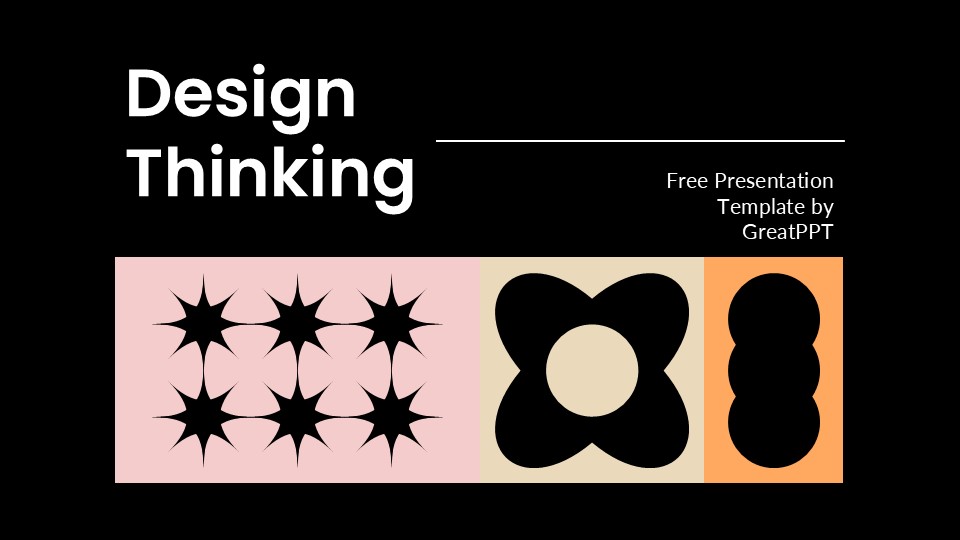
Unlike rigid corporate templates that rely on dark, heavy backgrounds or intimidating grids, this layout opts for a bright, clean, and energetic color palette. It features soft, modern pastel tones mixed with crisp typography, creating an inviting atmosphere that encourages brainstorming and open dialogue during creative sprints. The strategic use of white space ensures that your frameworks, user personas, and journey maps remain the focal point of every single slide.
Core Technical Features & Total Flexibility
A presentation asset is only valuable if it seamlessly fits into your team’s existing software ecosystem. This completely free template delivers versatile cross-platform compatibility:
Platform Agility: Fully optimized to download and edit natively across Google Slides, Microsoft PowerPoint, and Canva.
Standard Aspect Ratio: Built in a flawless 16:9 widescreen format, eliminating awkward margins or image stretching on modern conference room monitors, projectors, or Zoom shares.
100% Vector Customization: Every geometric shape, color container, and text element can be re-mapped with a single click to align with your specific company branding guidelines.
Icon Asset Kit: Packed with a comprehensive collection of scalable vector icons, making it simple to swap visual anchors without losing image sharpness.
Built-in Mapping & Visualizing Frameworks
Where this template genuinely saves hours of deck-building time is its specialized slide variety. It moves far past generic bullet-point layouts to offer dedicated interactive modules:
Empathy Maps & User Personas: Clean, pre-formatted profile slides to help your team define target audiences, user pain points, and behavioral goals.
Ideation Timelines: Step-by-step sequential graphics tailored to walk clients or stakeholders through your project’s development stages.
Brainstorming Grids: Structured layout blocks designed to categorize, prioritize, and vote on creative concepts during live, collaborative workshops.
The Verdict: A Must-Have Asset for Agile Teams
If you need to lead a team through a complex problem-solving process, pitch a UX/UI project to an investor, or present an agile strategy update, this template takes the design guesswork entirely out of your equation. It looks customized, feels premium, and keeps your audience locked into your narrative. Because it is available as a completely free download, it is an essential addition to any digital creator or business operator’s asset library.
Frequently Asked Questions (FAQ)
Can I modify this template to fit a more conservative corporate brand? Absolutely. Because the entire framework is fully editable, you can jump into the master slide settings inside PowerPoint, Google Slides, or Canva to swap out the bright palette for deep corporate blues or grays. The structural grids will still retain their high-utility layout.
Do I need to pay for any licensing fees to use these slides for commercial pitches? No. This presentation template is shared as a completely free resource on GreatPPT for both personal and professional applications. You can modify, present, and distribute your finalized decks to clients without worrying about hidden premium paywalls.
Will the typography break if I open the file on an older version of PowerPoint? The deck uses highly compatible system-safe and web-friendly typography systems. If you plan on presenting completely offline on an older machine, exporting your finalized slide deck as a high-resolution PDF or static image package is a solid industry backup plan to keep your layouts locked in perfectly.
Share Now!
Presentation Tips

Recent Templates



Related Products
Same Contributor


Featured Products